In this project, I built a Video Transcoding Service using Turborepo, NestJS, React, Docker, and other tools. The system supports features like uploading videos, queue-based background processing, format conversion with FFmpeg, and HLS output with auto-bitrate support. This article walks through the architecture, tech stack, challenges faced, and some key lessons learned during the process.
Tech Stack
- Turborepo – for monorepo orchestration
- NestJS – backend and APIs (Auth, Upload, Queue Management)
- React – frontend (upload form, progress viewer)
- PostgreSQL + Prisma – database and ORM
- BullMQ – job queue and worker system
- Docker – isolated video processing environment
- AWS S3 – for video storage (input and output)
Architecture Overview
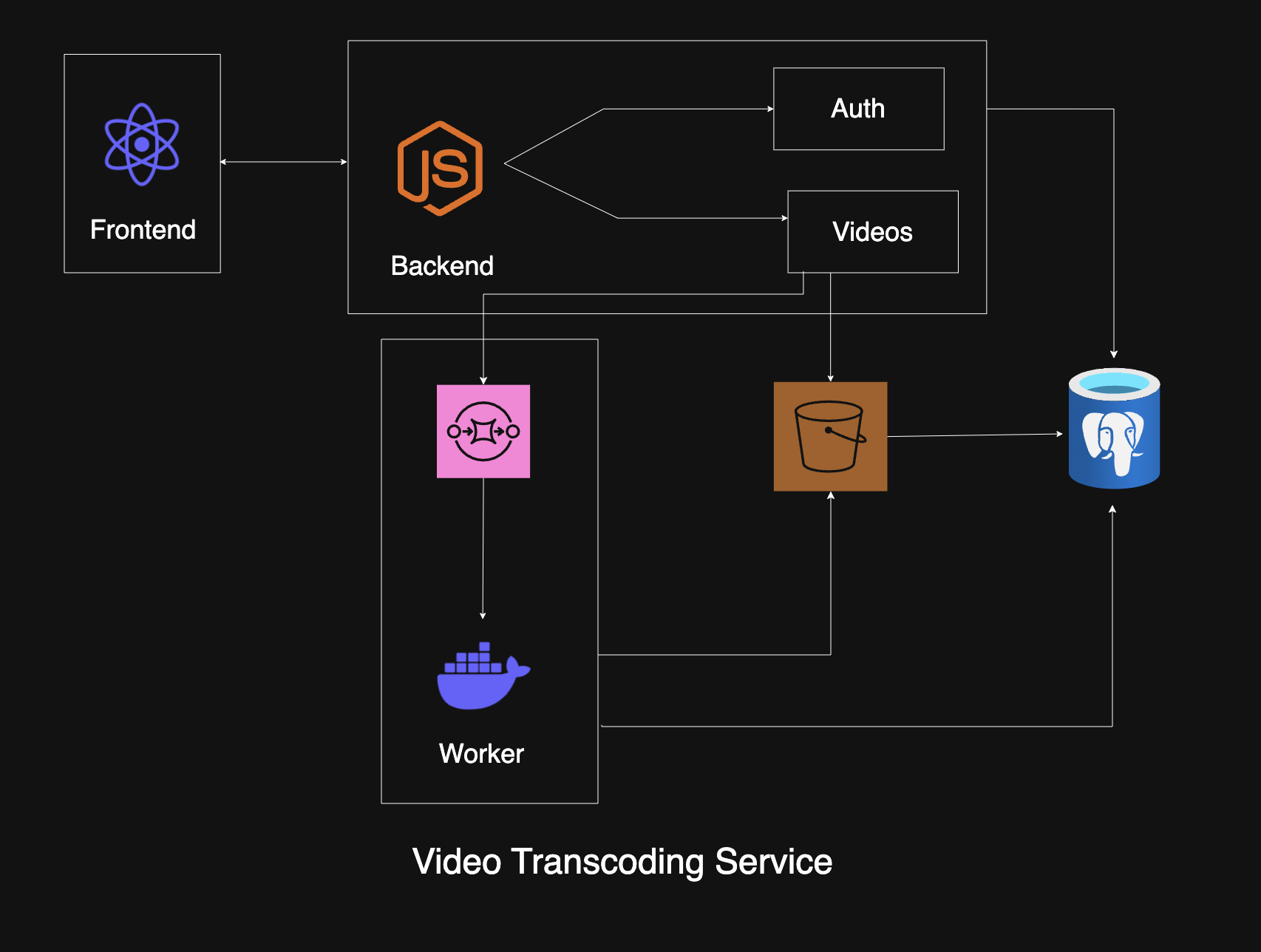
The overall architecture follows this flow:
- User uploads a video via the frontend; the backend receives it through NestJS.
- The backend uploads the raw video to AWS S3 and saves metadata in PostgreSQL.
- A new job is enqueued in BullMQ for video processing.
- A worker service picks the job and spins up a Docker container with:
- S3 video URL
- AWS credentials
- Inside the Docker container:
- The video is downloaded from S3.
- It is converted to
.m3u8using FFmpeg with multiple formats and auto-bitrate. - The processed folder is uploaded back to S3.
- The
master.m3u8URL is logged throughstdout.
- The worker listens to Docker logs, extracts the
master.m3u8URL, and updates the database.
Everything is designed to be fully decoupled, scalable, and cloud-native.
Challenges Faced
1. Choosing the Right Queue System
At first, choosing which queue system to use was frustrating. I didn’t want the overhead of Kafka or RabbitMQ just to manage basic jobs. I needed a simple, reliable, and Node.js-friendly solution.
I chose BullMQ — it offers Redis-based queues with good developer experience and async/await support.
2. Video Processing Inside Docker
Running FFmpeg inside Docker was a challenge. Some public images worked partially, but they were not customizable or were too heavy.
I built my own lightweight Docker image optimized specifically for FFmpeg and S3 integration. This allowed full control, faster spin-up, and a smaller footprint.
3. Uploading from Inside Docker and Updating the Database
Uploading to S3 inside Docker is straightforward, but there is a twist:
- We did not want to download the video on the main server.
- Docker does not have access to the database directly.
- We could not easily return data from Docker.
Solution: Instead of returning the processed URL through an API or database, I made the Docker container log the
master.m3u8URL.The worker listens to stdout, parses logs, and when a specific log is found, such as
HLS_READY: <URL>, it updates the database.This lightweight pattern was clean, effective, and flexible.
Key Lessons Learned
- Turborepo helped me manage shared types, interfaces, and services across multiple apps (frontend, backend, and workers).
- Docker is powerful but can be tricky when communicating with services outside its context.
- FFmpeg is a beast — combining formats, bitrates, and stream maps takes time and testing.
- Streaming logs and designing your own communication protocols, such as log-based status updates, can be extremely useful in decoupled systems.
- BullMQ is enough for most video processing workloads unless you hit extreme scale.
What’s Next?
Here are a few future improvements I’m planning:
- Add retry and failure queue handling in BullMQ
- Build a better job status dashboard with real-time updates
- Add CDN integration for fast HLS delivery
- Add auth and token-based video access control
- Support more formats, including audio-only and 4K rendering
Project Links
- Main Project Repository: GitHub – video_streaming
- Custom Docker Image Source: GitHub – ffmpeg_docker
- Docker Image: Docker Hub – abhishekshivale21/ffmpeg